Best eBay Listing Software & Tools Dated feature and pricing snapshots for 2026

Compare software for AI-assisted drafts, bulk editing, item specifics, cross-listing, inventory, pricing, and free-plan limits before you choose a stack.

4 tools compared
Side-by-side filters
Verify vendor pricing

Disclosure: ListTune publishes this directory and is included in it. Some outbound links may be affiliate links, which can earn ListTune a commission at no added cost to you. Third-party features and prices are dated snapshots; verify them with the vendor.

Need a plain-English definition?

Learn what counts as a listing tool first

The dedicated definition guide explains the categories and seller jobs without competing with this software comparison. Read it first, then return here to compare products and plans.

Read the listing tool definition

All eBay Listing Tools(4 tools)

🎯

Listing Optimization

Tools for titles, descriptions, item specifics, and listing review

1 tools
📊

Research & Analytics

Market research, competitor analysis, and performance tracking

2 tools
📦

Inventory Management

Track stock, manage SKUs, and automate inventory updates

0 tools
💰

Repricing Tools

Automated pricing optimization and competitor monitoring

0 tools
📸

Photo Editing

Image enhancement, background removal, and photo optimization

0 tools
📮

Shipping & Labels

Shipping management, label printing, and fulfillment automation

0 tools
💼

Accounting & Taxes

Financial tracking, tax preparation, and business analytics

0 tools
🎧

Customer Service

Automated messaging, feedback management, and customer support

0 tools
🤖

Automation Tools

Workflow automation, bulk operations, and process optimization

0 tools
🔄

Cross-Listing

Multi-platform selling and inventory synchronization

1 tools

Featured Tools

ListTune logo

ListTune

FEATURED

Entry reviewed 2026-07-10

AI-assisted eBay listing workflow for drafting item specifics, titles, and descriptions with seller review before publishing.

Price snapshot:Free

Last reviewed 2026-07-10. Verify current plans and trial terms with the vendor.

Key Features:

AI-assisted item-specific draftsBulk listing review and editingTitle and listing-quality checks+2 more

Best For:

eBay sellers reviewing incomplete item specificsStores that need a bulk revision workflow
Visit Site
Crosslist logo

Crosslist

Entry reviewed 2026-07-10

Cross-listing app for resellers that publishes one listing across major marketplaces from a unified workflow.

Price snapshot:$29.99/month Bronze

Last reviewed 2026-07-10. Verify current plans and trial terms with the vendor.

Key Features:

Cross-listing to 11+ marketplacesUniversal listing formAutoposting+3 more

Best For:

Resellers selling across many marketplacesSellers who need bulk listing updates
Visit Site
eBay Product Research (formerly Terapeak) logo

eBay Product Research (formerly Terapeak)

Entry reviewed 2026-07-10

eBay's first-party research tool in Seller Hub, with up to three years of sales and pricing data.

Price snapshot:Free

Last reviewed 2026-07-10. Verify current plans and trial terms with the vendor.

Key Features:

Up to three years of eBay sales dataAverage sold price and sold-price rangeAverage shipping cost+2 more

Best For:

Sellers researching sold-price rangesSellers comparing demand and shipping data
Visit Site
ListTune logo

ListTune

FEATURED

Entry reviewed 2026-07-10

AI-assisted eBay listing workflow for drafting item specifics, titles, and descriptions with seller review before publishing.

Price snapshot:Free

Last reviewed 2026-07-10. Verify current plans and trial terms with the vendor.

Key Features:

AI-assisted item-specific draftsBulk listing review and editingTitle and listing-quality checks+2 more

Best For:

eBay sellers reviewing incomplete item specificsStores that need a bulk revision workflow
Visit Site
PickerPath logo

PickerPath

Entry reviewed 2026-07-10

Route planning and sourcing tracker for resellers visiting garage sales, thrift stores, and estate sales.

Price snapshot:Free

Last reviewed 2026-07-10. Verify current plans and trial terms with the vendor.

Key Features:

Garage sale route planningInventory trackingCSV exports+2 more

Best For:

Resellers sourcing inventoryThrift store flippers
Visit Site

Related eBay listing guides

Use the dedicated definition and AI-lister guides when you need more detail than the directory provides.

Compare ListTune vs Other eBay Listing Tools

Switching from another tool? These pages compare published workflows, dated price snapshots, bulk-edit controls, and migration considerations.

Ready to Optimize Your eBay Listings?

Start with ListTune's AI-powered optimization tool. The Free plan includes 25 listing optimizations each month with seller review before publishing.

Start Free
How to use this comparison

Scope, pricing caveats, and seller safeguards

Compare tools by the seller job they address, then verify current features and pricing with the vendor. For AI-assisted work, keep factual fields editable and review every draft before publishing.

Comparison scope
4 tools
Filter the directory by seller job, feature category, free access, and AI support.
Pricing policy
Verify current plans
Plans and limits change. Confirm price, renewal terms, and add-ons on each vendor site.
AI safeguard
Seller review
Condition, measurements, compatibility, included items, and policy claims must stay editable.

Comparison methodology

  • Start with one seller job: draft a listing, revise a title, fill item specifics, bulk edit, cross-list, manage inventory, research demand, or ship orders.
  • Compare seller-verifiable output and controls: structured specifics, condition notes, photo workflow, batch safeguards, pricing visibility, and review before publish.
  • Only vendor records reviewed during 2026 appear in this directory. Older research is excluded until it is checked again against current vendor documentation.
  • Treat every third-party feature and price as a snapshot. Confirm current plan limits and terms on the vendor’s own site before buying.
  • ListTune publishes this directory and is included in it. Some outbound links are affiliate links, which may earn ListTune a commission at no additional cost to the reader.

Editorial owner: ListTune Editorial Team. Comparison framework updated July 10, 2026. Vendor features, free offers, and prices can change after publication.

Illustrative ListTune workflow

This fictional Sony Walkman example shows the review steps; it is not a customer result or a performance claim.

FieldBeforeAfter
InputVintage Sony Walkman works, scratches, headphones includedSeller note plus photos and category review
Titlesony walkman vintage tape playerSony Walkman WM-FX101 Portable Cassette Player AM/FM Radio Tested Vintage
Item specificsBrand onlyBrand, model, type, color, audio outputs, features, condition notes
Review stepManual form fill from scratchSeller verifies condition, included items, measurements, and shipping before publish
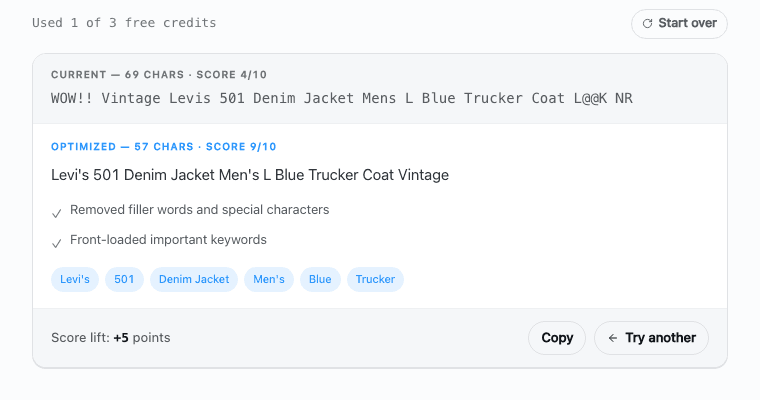
ListTune title optimizer showing original and revised title mechanics checks
Interface captured from ListTune's public title optimizer. The score checks title mechanics; it does not predict eBay rank, clicks, or sales.

In-depth eBay listing guides

Want a closer look at one category? These definition, optimization, and comparison guides go deeper than the directory above.

Reviewed eBay Seller Tools Guide (2026)

Below is a categorized reference of the currently reviewed eBay listing tools in this directory. Treat price snapshots and third-party feature notes as a starting point and confirm current details with each vendor before choosing a plan. Dates show when each directory entry was last reviewed; older records stay out until they are checked again.

Skip the comparison — ListTune's eBay listing tool helps draft titles and item specifics for seller review. Also see the AI eBay lister.

Try the eBay listing tool →

🎯 Listing Optimization

Tools for titles, descriptions, item specifics, and listing review

ToolBest For

ListTune

AI-assisted eBay listing workflow for drafting item specifics, titles, and descriptions with seller review before publishing.

Try free: Free eBay Title Optimizer · Free Item Specifics Enricher · InkFrog migration tool

eBay sellers reviewing incomplete item specifics; Stores that need a bulk revision workflow

📊 Research & Analytics

Market research, competitor analysis, and performance tracking

ToolBest For

eBay Product Research (formerly Terapeak)

eBay's first-party research tool in Seller Hub, with up to three years of sales and pricing data.

Sellers researching sold-price ranges; Sellers comparing demand and shipping data

PickerPath

Route planning and sourcing tracker for resellers visiting garage sales, thrift stores, and estate sales.

Resellers sourcing inventory; Thrift store flippers

🔄 Cross-Listing

Multi-platform selling and inventory synchronization

ToolBest For

Crosslist

Cross-listing app for resellers that publishes one listing across major marketplaces from a unified workflow.

Resellers selling across many marketplaces; Sellers who need bulk listing updates

How to Choose the Right eBay Listing Tool

1. Match the tool to your selling stage

Start with the narrowest tool that solves the work you do repeatedly. Test a free plan or trial when one is available, and use a representative group of listings so you can compare corrections, review time, publishing errors, and total cost.

2. Decide what you need most

eBay tools fall into different categories. Listing optimization tools help revise titles, descriptions, and item specifics. Research tools surface market and competitor information. Inventory management tools coordinate stock and orders, while shipping tools support labels and fulfillment. Choose the category that matches the bottleneck you can measure.

Migrating from InkFrog?

InkFrog's listing service has shut down. Use the dedicated migration guide for the shutdown timeline, data-export checks, and dated historical plan context; verify current replacement-tool terms with each vendor.

See the InkFrog migration guide and alternatives

ListTune's dedicated eBay tools

For listing optimization specifically, ListTune offers purpose-built tools — each with its own in-depth guide:

3. Consider AI vs. manual tools

AI-assisted tools can draft titles, suggest item specifics, or edit photos, but they can also repeat an error across a batch. Compare total review-and-publish time with your current process and keep seller approval enabled until the output is consistently accurate for your inventory.

4. Check multi-platform support

If you sell on eBay plus other marketplaces, compare cross-listing coverage, inventory sync behavior, delisting controls, and how each platform's required fields are handled. If you sell only on eBay, compare eBay-specific item specifics and revision controls instead of paying for channels you do not use.

5. Start with a bounded trial

Free offers and trials vary and can change. Verify the current terms, then measure saved review time, error rate, and total monthly cost during the test period. Stop or switch tools when the measured benefit does not justify the cost.

Frequently Asked Questions

Which eBay listing software should I choose?

Choose by the job you need to solve: creating drafts, revising titles and item specifics, bulk editing, cross-listing, inventory control, research, or shipping. Check the vendor’s current feature and pricing pages, then test a representative batch before committing.

Are there free eBay listing tools?

Yes. eBay provides Seller Hub, and some third-party tools offer a free tier or trial. ListTune currently includes 25 monthly listing enrichments on its Free plan. Other offers can change, so verify limits and renewal terms with each vendor.

What should I compare in AI listing software?

Compare the source information required, fields produced, item-specific coverage, batch controls, export or publish workflow, pricing, and the seller-review step. AI output can be incomplete or wrong, so condition, measurements, compatibility, and included items must remain editable.

How much does eBay listing software cost?

Options range from free first-party tools and limited free plans to monthly subscriptions and custom enterprise contracts. ListTune’s paid Starter plan begins at $19 per month. Verify current prices, usage limits, and add-on fees on the vendor’s own site.

How should I test a listing tool before paying?

Use a representative group of listings and record total review-and-publish time, corrections required, fields left blank, and any publishing errors. Keep seller approval enabled and do not judge value from generated copy alone.

More Free Seller Tools