
How to Optimize eBay Listings in 2026: SEO Checklist
A practical eBay listing optimization checklist for 2026 covering titles, item specifics, photos, descriptions, pricing, and listing audits.
Want to make your eBay listings clearer and easier to audit? Start with product facts a seller can verify and performance changes the seller can measure in their own account.
This guide covers seller-controlled listing changes and a measurement process. None of these changes guarantees rank, clicks, or sales.
Example Listing Audit: Before and After
This fictional example shows the review steps; it is not a customer listing or a performance result. A used-electronics example is useful because condition, accessories, and model details must be verified instead of inferred from generic catalog data.
ListTune-Style Listing Audit Example
| Feature | Before optimization | After seller-reviewed draft |
|---|---|---|
Title Adds brand, model, product type, key feature, tested status, and buyer-searchable terms | sony walkman vintage tape player | Sony Walkman WM-FX101 Portable Cassette Player AM/FM Radio Tested Vintage |
Item specifics Fills structured fields buyers use for filters and comparison | Brand only | Brand, Model, Type, Color, Audio Outputs, Features, Condition notes |
Description Keeps condition clear without inventing unsupported claims | Works good has scratches | Tested portable cassette player with AM/FM radio. Cosmetic scratches shown in photos. Includes headphones; batteries not included. |
Review step Optimization should improve the draft while preserving seller accountability | Publish from memory | Seller verifies model number, flaws, accessories, measurements, shipping weight, and photos before publish |
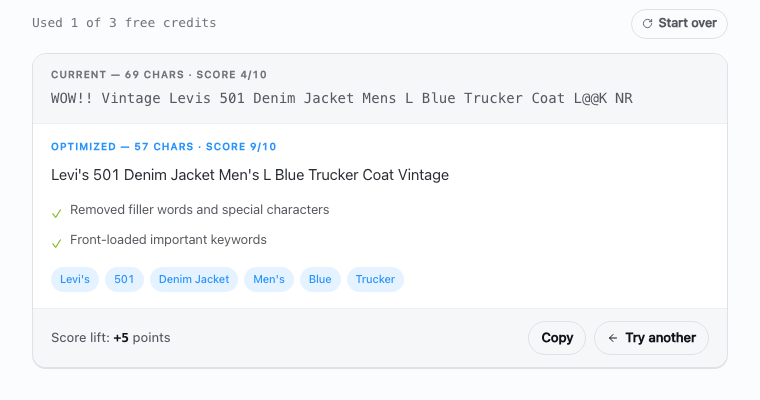
Editorial review: the ListTune Editorial Team checked that each recommendation maps to a seller-visible action: title structure, item-specific coverage, condition notes, photo evidence, shipping clarity, price review, or a measured listing audit. Marketplace guidance should be checked against current eBay documentation and the seller's own data.

Why eBay Optimization Matters in 2026
eBay gives sellers 80 title characters, category-specific item specifics, descriptions, and up to 24 photos. Buyers use titles and filters to narrow results, so accurate structured data and clear photos make the offer easier to evaluate.
The 2026 eBay Listing Optimization Checklist
Competition is high and buyers make quick decisions. Your listings need to make the right product facts obvious in search results and on the item page.
💸 The Cost of Poor Optimization
Optimized vs Unoptimized Listings
| Feature | Unoptimized | Optimized |
|---|---|---|
Search Visibility More ways for buyers to filter and find the listing | Missing specifics | Complete specifics |
Click-Through Rate More buyer-searchable facts visible in search results | Short, vague title | Specific 80-character title |
Buyer Confidence The buyer can evaluate the offer without invented performance claims | Important facts are hard to find | Condition, measurements, and included items are explicit |
Measurement The seller can compare impressions, views, watchers, and sales | No change log | Revision date and eBay metrics recorded |
Title Optimization: Your First Impression

Your title is one of the first listing elements buyers see in search. It can influence whether the right buyer understands the item and chooses to open the listing.
🎯 A Practical Title Structure
Illustrative structure: "Apple iPhone 14 Pro Max 256GB Deep Purple Unlocked Used"
Only include model, storage, color, lock status, and condition when each fact matches the item.
📄 Title Optimization Best Practices
Title Optimization Process
- Use All 80 Characters Use available space for verified product facts when they improve clarity Use the available space for useful product facts Do not add filler merely to reach a target length Don't sacrifice readability for length Character count includes spaces - use them wisely!
- Front-Load Important Keywords Put identifying product facts early so they remain visible on smaller screens Brand name (if applicable) Product type Model/specifications Distinguishing features Condition descriptors Put the most identifying facts early so they remain easy to scan
- Strategic Keyword Research Use eBay's own suggestions and Product Research as inputs, then keep only terms that accurately describe the item Type your main keyword in eBay search Note the autocomplete suggestions Check 'People also searched for' results Analyze top-selling competitor titles Use Product Research (formerly Terapeak) in Seller Hub to inspect relevant sold-listing data
- Avoid Common Mistakes Remove wording that wastes space, reduces clarity, or misrepresents the item No ALL CAPS (except acronyms) Avoid excessive punctuation!!!! Don't stuff keywords repetitively Skip promotional language (LOOK, WOW) Avoid symbols like ♥ ★ ♫ Keep it professional and buyer-focused
Title Rewrite Example
| Feature | ❌ Before | ✅ After |
|---|---|---|
Title Professional, keyword-optimized approach | LOOK!!! AMAZING Samsung Phone - CHEAP!!! | Samsung Galaxy S23 Ultra 256GB Phantom Black - Unlocked - Mint Condition |
Product facts More identifying information without a fabricated traffic result | Brand and product type only | Brand, model, capacity, color, network, and condition |
Seller check Verify the model, storage, lock status, and condition before publishing | Promotional claims are unsupported | Every attribute must match the item |
📋 Category-Specific Title Templates
Example title structures by category: Electronics: [Brand] [Product Line] [Model] [Capacity] [Color] - [Network/Compatibility] - [Condition] Fashion & Apparel: [Brand] [Gender] [Item Type] [Size] [Color/Pattern] [Material] [Style] [Condition] Collectibles: [Year] [Brand] [Product Name] [Series] [Condition] [Rarity] [Authentication] Auto Parts: [Brand] [Part Type] [Fits Year Make Model] [OEM Number] [Position] [Condition] Home & Garden: [Brand] [Item Type] [Dimensions] [Material] [Color/Finish] [Style] [Condition]Pricing From Comparable Evidence
Start with your costs and recent comparable items. eBay's Product Research can help you inspect similar sold listings; a universal ending or discount rule cannot tell you the right price for one item.
🧠 Price-format tests
Pricing choices to test, not assume
#### 2. Anchoring Strategy
If selling multiple similar items:
- List premium version first at higher price
- Follow with standard version
- The standard now seems like great value
Same buyer total, different shipping presentation
| Feature | Separate shipping | Shipping included |
|---|---|---|
List Price Same total cost to buyer | $29.99 | $39.99 |
Shipping Cost Buyer sees one item price and no separate shipping line | $10.00 | Free |
Seller margin Compare total fees, shipping cost, and buyer response in your own data | Shipping charged separately | Shipping included in item price |
Required check Test similar listings; neither presentation guarantees a better result | Compare buyer total | Recalculate fees and margin |
📈 Dynamic Pricing Strategies
#### 1. Time-Based Pricing
- Test price changes on a limited set of comparable listings
- Account for fees, shipping, returns, and minimum acceptable margin
- Use your own sales history and current sold comparables instead of a fixed calendar rule
#### 2. Competitive Intelligence
Check comparable pricing when inventory, costs, or market conditions justify a review:
- Identify top 10 competitors in your niche
- Track their pricing changes
- Position yourself strategically (not always lowest)
- Highlight unique value propositions
#### 3. Bundle Pricing
Bundling can be useful when the items genuinely belong together:
- Complementary products (phone + case)
- Bulk quantities with discounts
- "Starter packs" for hobbyists
- Seasonal bundles
Photo Coverage Buyers Can Inspect
Photos should document the exact item, its condition, included parts, labels, and scale. They help a buyer inspect the offer; they do not guarantee a sale. For a full shooting workflow covering lighting, focus, condition evidence, and color accuracy, see product photography tips for eBay sellers.
Use the available photo slots deliberately
eBay currently allows up to 24 photos per listing. You do not need to fill every slot; use enough original photos to answer buyer questions. A useful sequence:
- Hero Shot: Professional main image, white background
- Lifestyle Shot: Product in use/context
- Size Reference: Product with common object for scale
- All Angles: Front, back, sides, top, bottom
- Close-ups: Important details, textures, labels
- Flaws/Wear: Honest condition documentation
- Packaging: What buyer receives
- Accessories: Everything included
- Identifiers: Serial numbers, tags, or certificates when safe and relevant
- Additional evidence: Any remaining detail a buyer cannot verify from the earlier photos
Current photo basics
#### Resolution and Size
- Minimum: 500x500 pixels
- eBay recommendation: At least 1600x1600 pixels
- File size: Under 12MB per image
- Format: Use a photo format accepted by eBay and check the uploaded image for accurate color and detail
#### Lighting Essentials
- Natural daylight or daylight-balanced LEDs
- Avoid harsh shadows (use diffusers)
- Consistent lighting across all photos
- No flash reflections on shiny surfaces
#### Background Best Practices
- White/light gray for main image
- Lifestyle shots can have context
- Remove distracting elements
- Maintain consistency across listings
Mobile-First Photo Strategy
Optimize photos for small screens:
- Main subject fills most of the frame
- High contrast for clarity
- Test visibility at thumbnail size
- Important details in center (avoid edges)
- Photograph labels or specifications that are physically present on the item
Description Writing: Make the Offer Verifiable
Use the description for facts that do not fit cleanly in the title or structured fields: exact condition, measurements, testing, included parts, compatibility, shipping, and returns.
A factual description structure
#### 1. Opening summary
State what the item is and its most important verified condition detail:
- Name the exact product or part
- State condition and the most important limitation
- Mention what is included when it changes the offer
#### 2. Key facts
Use bullet points for scannability:
- List model, dimensions, material, compatibility, and included parts
- Separate observed condition from assumptions
- Reference photos when documenting wear or damage
- Do not copy awards, reviews, or claims that do not apply to the exact item
#### 3. Detailed Specifications
Organize information logically:
- Group related specs together
- Use tables for technical data
- Bold important details
- Include all relevant measurements
#### 4. Condition Details
Transparency builds trust and reduces returns:
- Be specific about any flaws
- Reference photo numbers
- Explain testing performed
- Mention missing items
#### 5. Shipping & Policies
Clear policies reduce uncertainty about fulfillment and returns:
- Processing time
- Shipping methods and times
- Return policy details
- International shipping availability
#### 6. Final check
End with useful next steps:
- Invite questions about facts not already covered
- State the applicable return terms accurately
- Remove artificial scarcity and unsupported guarantees
Description wording and readability
#### Product terminology
Use terminology that accurately identifies the item:
- Use the brand, model, product type, and part number where verified
- Prefer exact measurements and compatibility over keyword repetition
- Do not insert unrelated search terms
#### Formatting for Readability
- Short paragraphs (2-3 sentences)
- Bullet points for features
- Bold for emphasis (sparingly)
- White space between sections
- Mobile-friendly line lengths
KEY FACTS: • [Brand, model, dimensions, material] • [Testing performed] • [Included and excluded parts] • [Compatibility, only when verified]
📋 SPECIFICATIONS: [Organized list of specs]
🔍 CONDITION: [Detailed condition with photo references]
📦 SHIPPING: [Clear shipping information]
POLICIES: [Accurate shipping, returns, and warranty terms]
Item Specifics: Structured Buyer Filters
While we have a comprehensive guide on item specifics, here's how they fit into overall optimization:
Quick Wins with Item Specifics
- Complete every field eBay currently marks required for that category
- Fill the recommended fields buyers actually filter by
- Use buyer language (not technical jargon)
- Include measurements in multiple units
- Add compatibility information
What completion changes
| Seller action | Observable buyer benefit | What it does not prove | |--------------|--------------------------|------------------------| | Complete required fields | Listing can be submitted or revised under current category rules | A higher search position | | Add accurate recommended fields | Buyers may be able to find and compare the item through more filters | More impressions or clicks | | Match exact product identifiers | Reduces ambiguity about the product version | A sale or lower return rate | | Verify condition and compatibility | Gives buyers clearer evidence before purchase | That every buyer will interpret it the same way |
Shipping Terms Buyers Can Understand
Choose shipping terms you can fulfill profitably and describe accurately.
Shipping included versus separate
Including shipping in the item price can provide:
- A single advertised item price
- Simpler comparison when buyers expect shipping included
- A need to recalculate marketplace fees and margin
Smart Shipping Strategies
#### 1. Calculated vs. Flat Rate
- Calculated: Useful when package size and buyer distance materially change the cost
- Flat rate: Simpler when your actual costs stay within a range you can absorb
- Free shipping: Build cost into item price
#### 2. Regional Shipping Optimization
- Compare the services available for the package size, weight, destination, tracking, and insurance needs
- Compare eBay label rates against your own carrier accounts
- Do not promise a service or handling time your workflow cannot meet
#### 3. Fast Handling Times
Fast handling can improve buyer confidence:
- Set a handling cutoff your operation can meet consistently
- Pre-package only when the item can still be checked before dispatch
- Upload tracking when the shipment actually enters your fulfillment workflow
Timing Listings From Your Own Data
Timing matters most for auctions and seasonal inventory. Use your own buyer and sales data rather than a universal schedule:
Choose timing from evidence
- Check when comparable items actually sell.
- For auctions, schedule the ending when likely buyers can participate.
- For fixed-price listings, prioritize inventory accuracy and handling capacity over a claimed “best” hour.
#### Seasonal timing
Use your own sales history, inventory lead time, and relevant calendar events. A universal month table ignores geography, item type, condition, price, and buyer demand.
Duration Strategy
- Auction: Consider when value is uncertain or the item is unique and likely to attract multiple bidders
- Fixed price: Consider when you know the price you will accept or have multi-quantity inventory
- Duration: Select a duration you can support; no duration guarantees exposure or urgency
Mobile Optimization for Fast Scanning
Mobile buyers behave differently. Optimize for their needs:
Mobile-First Design Principles
#### 1. Title Optimization for Mobile
- Put the most identifying facts early enough to remain easy to scan
- Brand and model upfront
- Condition clearly stated
- Price-related keywords visible
#### 2. Mobile-Friendly Descriptions
- Key info above the fold
- Use short paragraphs and descriptive bullets
- Bullet points over paragraphs
- Large, readable fonts
- Avoid tables (use lists instead)
#### 3. Image Optimization
- Square images work best
- High contrast for small screens
- Zoom-friendly detail shots
- Keep photos free of added text, artwork, logos, and watermarks
Competitive Analysis Techniques
Checking what your competitors are doing helps you improve your own listings. Here's how:
The 5-Step Competitive Analysis Process
#### Step 1: Identify True Competitors
- Search your main keywords
- Filter by "Sold listings"
- Note top 10 sellers
- Analyze their strategies
#### Step 2: Analyze Their Strengths
- Title structure and keywords
- Pricing strategies
- Photo quality and quantity
- Description format
- Shipping offers
- Return policies
#### Step 3: Identify Gaps
- Missing item specifics
- Poor photo quality
- Weak descriptions
- Limited shipping options
- No video content
#### Step 4: Differentiate Your Listings
- Superior photography
- More detailed specifications
- Clearer, accurate return and warranty terms
- Faster shipping
- Bundle opportunities
#### Step 5: Monitor and Adjust
- Recheck comparable inventory when price, supply, or season changes
- Track pricing changes
- Note new strategies
- Adjust accordingly
Tools for comparable research
- Product Research in eBay Seller Hub: Comparable listings and historical marketplace data available to your account
- eBay Seller Hub: Your own listing and performance metrics
- A revision log: Listing IDs, dates, exact changes, and before/after measurement windows
Tracking and Improving Performance
Tracking your numbers is important. Here's what to watch:
Key Performance Indicators (KPIs)
#### Traffic Metrics
- Impressions: How often your listing appears
- Click-through rate: Percentage who click
- Page views: Total listing visits
- Watch count: Buyer interest indicator
#### Conversion Metrics
- Conversion rate: Views to sales ratio
- Average selling price: Revenue per item
- Sell-through rate: Percentage of inventory sold
- Time to sale: Days from listing to sale
#### Quality Metrics
- Feedback score: Buyer satisfaction
- Defect rate: Returns and cases
- Late shipment rate: Fulfillment performance
- Response time: Customer service speed
Build account-specific benchmarks
Compare each listing with similar inventory in the same category, price band, condition, and season. A universal threshold can be misleading; use your own recent baseline and record every material revision.
A repeatable review routine
- Choose a stable measurement window and export a baseline.
- Select a bounded group of comparable listings.
- Make one clearly documented class of change.
- Allow enough time for the listings and buyer behavior to produce usable data.
- Compare equivalent periods and keep, reverse, or investigate the change.
Advanced Optimization Strategies
Want to go beyond the basics? Here are some advanced techniques:
1. Dynamic Keyword Optimization
Adjust keywords based on seasonal trends:
- Use Google Trends for keyword research
- Compare seasonal demand with relevant sold-listing data in eBay Product Research
- Update a title only when you have a more accurate or clearer product term to test
- Test one documented title pattern on a bounded group rather than rewriting everything at once
2. Video Integration
Video can answer questions that still photos cannot:
- Show product in action
- Demonstrate size and scale
- Build trust with transparency
- Keep the video focused on product evidence a still photo cannot show
3. Cross-Promotion Mastery
- Link complementary products
- Create themed collections
- Offer bundle discounts
- Use promotional listings
4. International Optimization
- Use the international-shipping options currently available in your eBay account
- Include metric measurements
- Consider currency differences
- Optimize for translation
5. Seller Brand Building
- Consistent storefront branding
- Complete seller profile and storefront details
- Accurate photos of the item and anything included with it
- Build repeat customer base
Costly Mistakes to Avoid
Avoid these common mistakes that hurt sales:
1. The Set-and-Forget Syndrome
Listings need regular updates:
- Seasonal keyword adjustments
- Price competitiveness checks
- Photo updates for wear
- Policy changes compliance
2. Relevance and policy risks
Avoid these red flags:
- Keyword stuffing in titles
- Irrelevant search terms
- Duplicate listings
- Manipulation attempts
3. Ignoring Mobile Users
Desktop-only optimization can hide the details mobile buyers need to decide quickly.
4. Poor Customer Communication
- Slow response times
- Generic messages
- Ignoring questions
- No proactive updates
5. Inconsistent Information
- Title vs. description mismatches
- Photo inconsistencies
- Shipping confusion
- Return policy conflicts
Your 7-Day Optimization Action Plan

Want to improve your eBay listings? Here's a 7-day plan:
7-Day eBay Optimization Challenge
- Day 1: Audit Current Listings Export a representative batch and record a baseline before editing Choose comparable listings in one category and condition Record listing IDs, revision date, and current metrics Note observable content gaps Save the original data
- Day 2: Title Optimization Inspect titles for missing verified facts and wasted space Review eBay suggestions and Product Research Draft titles from verified product facts Check readability on a phone Revise only the bounded test group
- Day 3: Photo Enhancement Improve image quality and add missing angles Reshoot poor quality images Add missing angles/details Remove added text, artwork, logos, and watermarks Check the main image at thumbnail size
- Day 4: Description Rewrite Use a factual structure for condition, measurements, and included parts Implement template structure Document testing and flaws Include all specifications Verify shipping, return, and warranty wording
- Day 5: Item Specifics Completion Fill current required fields and relevant recommended fields accurately Complete fields eBay currently marks required Complete relevant buyer-facing recommended fields Use the values offered by eBay when they accurately fit Verify accuracy
- Day 6: Pricing and Shipping Compare sold evidence and recalculate total cost and margin Review comparable sold listings Account for fees, shipping, returns, and minimum margin Verify package size, weight, handling time, and service Test shipping presentation only on comparable inventory
- Day 7: Monitor and Adjust Log the revision and define an equivalent future comparison window Confirm only intended listings changed Record the exact fields revised Choose a comparison window long enough for useful data Avoid another change before the test can be evaluated
Conclusion: Make Changes You Can Verify
Optimizing eBay listings is an ongoing process, not a one-time fix. The strategies in this guide can help make product data clearer and easier to evaluate, but they do not guarantee traffic or sales.
Start with accurate product data, keep the test bounded, and let your own account data determine the next change.
Key Success Principles
See the pricing page for current plan prices, credit limits, and terms.
Key Takeaways
• Title optimization starts with searchable facts - Use the 80-character limit for brand, model, item type, size, material, compatibility, condition, and other buyer-facing specifics • Mobile-first listings are easier to scan - Put the most important product facts early in the title and use short description sections buyers can read quickly • Complete item specifics improve matching - Fill required fields first, then add the optional fields buyers commonly filter by in your category
• Photos should answer buyer questions - Use clear angles, close-ups of flaws, scale references, labels, included parts, and condition details • Strategic pricing beats blind discounting - Compare sold listings, account for shipping and fees, and test price changes on stale inventory instead of racing to the bottom • Compelling descriptions reduce uncertainty - Focus on condition, measurements, included items, compatibility, shipping, and return-relevant details
• Shipping optimization matters - Offer clear handling times, tracking, and shipping terms that match what buyers expect for the category • Data-driven optimization beats assumptions - Track views, watchers, sell-through rate, and revision history before deciding what to change • Category-specific details matter - Tailor titles, photos, specifics, and descriptions to the fields and product facts relevant to each category • Use measured revision cycles - Review stale listings, fix missing specifics, replace weak photos, and revise vague titles when your own data supports a test
Sources reviewed
- eBay Seller Center: Create great listings
- eBay Seller Center: Item specifics
- eBay Seller Center: Take great photos
- eBay Help: Optimize listings for Best Match
Marketplace tools and policies change. These official pages were reviewed July 10, 2026; verify the current listing form and policy shown in your own account before revising live inventory.